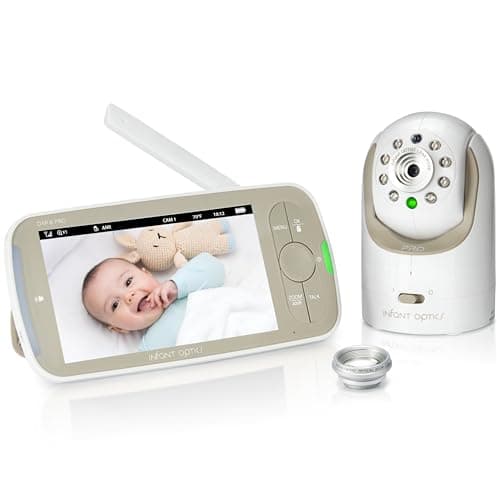
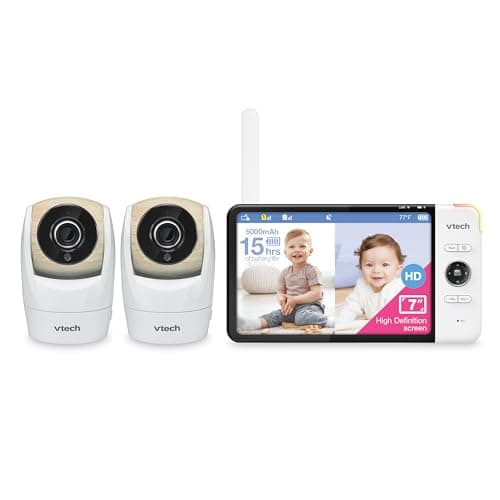
If you've decided you want a no-WiFi monitor — a private screen with nothing to hack over the internet — two names come up again and again: the Infant Optics DXR-8 PRO and the VTech VM919-2HD. Both are dedicated-screen monitors on a closed radio link, so neither one can be reached from outside your home. The real question is what your household needs: one great camera, or two. Here's the honest, spec-based breakdown.
The one-line verdict
Buy the Infant Optics DXR-8 PROif you're monitoring a single nursery and want the most refined single-camera experience — its interchangeable lenses and long reliability reputation are the draw. Buy the VTech VM919-2HD if you need to watch two rooms or two children at once; it ships with two cameras and a bigger split-screen, and covering two rooms with the Infant Optics would mean buying and pairing extra hardware. For most single-baby homes the Infant Optics is the nicer tool; for two-room coverage the VTech wins on value outright.
Screen size and video quality
The VTech has the larger display — a 7-inch screen versus the Infant Optics' 5-inch — and that extra real estate is what makes its split-screen usable, letting you see two camera feeds side by side. The Infant Optics counters with a sharp, well-tuned 5-inch HD picture and, more importantly, interchangeable lenses: you can fit a wide-angle optic to take in a whole room or a zoom lens to frame the crib closely, something neither the VTech nor most rivals offer. If raw screen size and two-up viewing matter most, the VTech leads; if picture flexibility on a single camera matters more, the Infant Optics does.
Add-a-camera support
This is the clearest split between them. The VM919-2HD comes with two cameras in the box and a split-screen built to show them together — it is designed from the start for a multi-room home, and you can expand further. The DXR-8 PRO supports adding cameras too and can cycle between them, but it ships as a single-camera unit and doesn't do true side-by-side split-screen the way the VTech does. If you already know you'll be watching two spaces, the VTech saves you money and hassle; if you only ever need one view, the Infant Optics' single-camera focus is no drawback.
Range and battery
Both are built for whole-home coverage, with range up to roughly 1,000 feet in open conditions — expect less through walls and floors, as with any monitor. Battery life is comparable and depends heavily on whether you use voice-activated (VOX) standby, which blanks the screen until sound wakes it; leaving the display on all night drains any monitor faster. Neither has a decisive edge here; both will comfortably last a night on standby and recharge during the day.
Interchangeable lenses: the Infant Optics' signature
It's worth dwelling on the DXR-8 PRO's standout feature, because nothing on the VTech matches it. Being able to physically swap the lens means one camera can serve very different rooms and stages — a wide view for a nursery you want to see all of, a zoomed optic for watching a sleeping newborn's face from across the room. It's a genuinely useful bit of flexibility that, for a single-camera household, can outweigh the VTech's bigger screen.
Value
Value depends entirely on how many cameras you need. If you want one camera, the Infant Optics gives you a more refined single-camera monitor for roughly what you'd expect to pay for a premium screen unit. If you want two, the VTech is the better buy by a wide margin — two cameras and a split-screen in one box cost far less than a single premium camera plus a second add-on. Buying a two-camera set only to use one camera, though, is money you don't need to spend.
Privacy and security
Here the two are equals, and both win. Neither connects to the internet: the camera and screen talk over a private radio link, so there's no app, no account, and no remote path for anyone to reach the feed. This is the whole reason to choose a no-WiFi monitor, and it applies equally to both. As always, check the CPSC recalls database in our sources before buying, and keep any power cords well out of the crib. If you think you might want phone viewing or sleep tracking down the line, that's the one thing neither of these can do — our best WiFi baby monitors covers the smart-camera side, and our WiFi vs. no-WiFi guide weighs the tradeoff.
Which should you buy?
Choose by rooms, not by brand. One nursery, one baby, and a wish for the most polished single-camera monitor? The Infant Optics DXR-8 PRO, with its interchangeable lenses, is the one to get. Two children, two rooms, or a crib and a playroom to keep an eye on? The VTech VM919-2HD's two cameras and split-screen make it the obvious, better-value pick. Either way you're getting a private, no-internet monitor — and either way, safe sleep in a proper crib comes first. For the wider field, see our best baby monitors roundup, or if you're not sure you need a monitor at all, start with do you need a baby monitor.